The Query Loop is the single most useful element in Bricks Builder, and the one most people use at a fraction of its capability. It takes a container you have designed once and repeats it for every post, product, term or user that matches a query. Blog grids, product archives, team pages, testimonial sliders, related-post rows and directory listings are all the same element with different settings.
This guide covers how the loop works, the settings that actually matter, how to pull dynamic data into it, and the handful of mistakes that account for most “why is my loop empty” questions.
What a Query Loop actually does
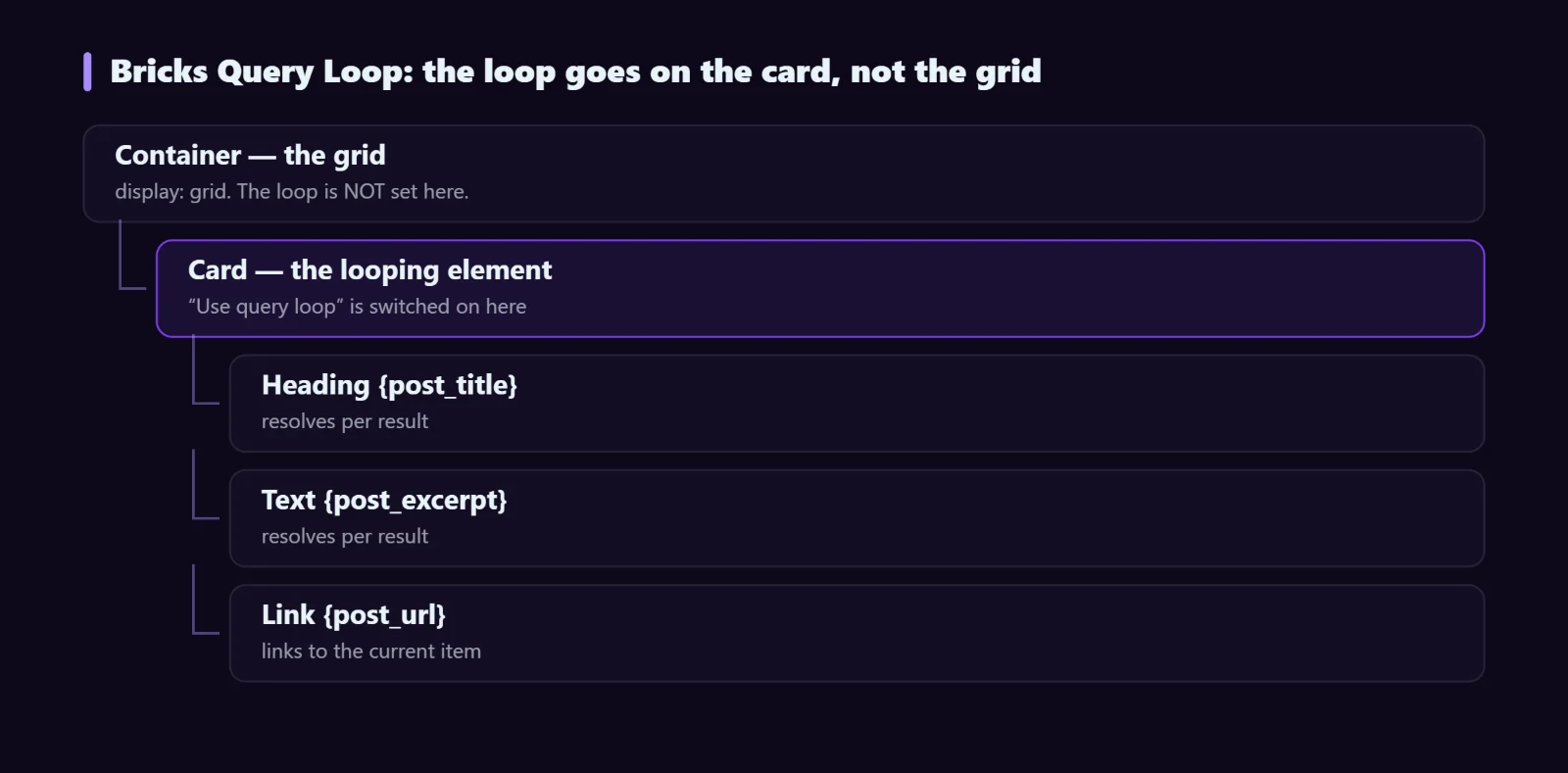
As the official Bricks Query Loop documentation puts it, any Bricks container, div or block can become a loop. You switch on Use query loop in its settings, and Bricks renders that element once per result instead of once in total. Everything inside it — headings, images, buttons — is rendered per result, so dynamic data tags inside resolve against the current item.
Two things follow from this that are worth internalising early:
- The looping element is the repeated item, not the grid. If you want a three-column grid of cards, the parent is the grid and the child carries the loop. Putting the loop on the grid gives you three separate grids.
- Dynamic tags inside the loop resolve per item. Outside the loop,
Bricks Builder Query Loop: A Complete Guidemeans the current page. Inside it, it means the current result.
Building your first loop
1. Build the card first, loop second
Design one card with real placeholder content: image, category, title, excerpt, link. Get the spacing and typography right while you can see exactly one of them. Turning on the loop before the card looks right means styling a moving target.
2. Wrap it in a grid
Put the card inside a container and give that container a grid layout — display: grid with grid-template-columns: repeat(auto-fill, minmax(300px, 1fr)) is a good default, because it reflows without media queries.
3. Turn on the loop
Select the card and switch on the query loop. Set the post type, how many to show, and the order. Bricks immediately renders the card as many times as the query returns.
4. Swap placeholders for dynamic data
Replace each piece of placeholder content with its dynamic tag:
Bricks Builder Query Loop: A Complete Guide        → the title
The Query Loop repeats one card you design for every post, product, term or user. How it works, the settings that matter, and the mistakes that leave it empty.      → the excerpt
https://djia-bricks.com/bricks-query-loop-guide/          → permalink, for the link field
    → the featured image
October 3, 2026         → publish date
Tutorials  → category names, no links
For custom fields, Bricks reads ACF, Meta Box and Pods directly. The Dynamic Data module adds 80+ further tags across post, user, WooCommerce and form data if you need values Bricks does not expose natively.
Bricks Query Loop settings that matter
| Setting | What to watch for |
|---|---|
| Post type | You can select several at once. Mixed types need care: a tag that exists on one type and not another renders empty. |
| Posts per page | -1 means all. On a large site this is how you accidentally query 4,000 posts into one page. |
| Offset | Skips the first N results. Useful for a “featured first, rest below” layout built from two loops. |
| Order by | Date, title, menu order, random, or a meta value. Ordering by a meta value needs the meta key and the right type (numeric vs string) or the sort looks scrambled. |
| Taxonomy query | Filter by term. The relation setting (AND / OR) decides whether an item must match all terms or any. |
| Meta query | Filter by custom field. Compare operators and value type matter — “greater than” on a string compares alphabetically. |
| Exclude current post | Switch this on for related-post loops, or the current article shows up in its own list. |
Loop types beyond posts
The query type dropdown is not limited to posts:
- Terms — loop over categories, tags or a custom taxonomy. This is how you build a “browse by category” row that stays current as terms are added.
- Users — loop over users by role. Team pages and author directories.
- Repeater fields — loop over ACF or Meta Box repeater rows on the current post, for things like spec tables or FAQ lists.
Letting visitors filter the loop
A loop renders whatever its query says and does not change after load. The moment you want visitors to narrow it — by category, price, attribute or keyword — you need something that intercepts the query and re-renders over AJAX.
The Djia Filters module adds 15 filter elements that attach to any Query Loop by CSS selector, with URL sync and a cached index for large result sets. The step-by-step filter guide walks through a full build.
Pagination and infinite scroll
Bricks has a Pagination element. Drop it below the loop and it picks up the nearest loop automatically in most layouts; if you have several loops on one page, set the query ID explicitly so pagination targets the right one.
One detail that trips people up: pagination on a page rather than an archive needs the query to be aware of the paged parameter. If page 2 shows the same results as page 1, that is the cause.
Bricks Query Loop performance on large loops
- Never use -1 on a public page. Paginate instead. A loop of 500 cards is 500 images and a very slow Largest Contentful Paint.
- Lazy-load images below the fold, but set
loading="eager"andfetchpriority="high"on the first card’s image if it is the largest element on screen. - Avoid meta queries where a taxonomy would do. Taxonomies are indexed; post meta is not, and a meta query across thousands of rows is slow.
- Watch nested loops. A loop inside a loop multiplies queries. Twenty cards each running their own sub-query is twenty extra round trips.
Troubleshooting
The loop renders nothing
Work down this list: is the post type public and does it have published posts; is a taxonomy or meta filter excluding everything; is the offset larger than the number of results; are the posts in a status other than published.
Every card shows the same content
The loop is on the wrong element. The dynamic tags are resolving against the page rather than the loop item, which happens when the tags sit outside the looping element even though they look nested in the canvas.
The grid has one column per row
The loop is on the grid container rather than the card. Each iteration renders a whole new grid with one child in it. Move the loop down one level.
Ordering by a custom field looks random
The field is being sorted as text, so 10 sorts before 9. Set the meta type to numeric in the query settings.
FAQ
How many Query Loops can one page have?
There is no hard limit, but each one is a database query. Three or four is normal for a homepage; a dozen is a sign that some of them should be merged or cached.
Can I use PHP to modify the query?
Yes. Bricks exposes filters that let you alter the query arguments for a given loop, which is the right approach for logic the UI cannot express — “posts this user has access to”, for example.
Does a Query Loop work inside a template?
Yes, and that is usually where it belongs. A loop in an archive template renders for every archive; a loop in a single template is how you build related-post sections.
Where to go next
Once your loops are solid, the two things that make them feel like an application rather than a list are filtering and conditional display. Djia Bricks covers both: AJAX filters for narrowing results, and conditions and dynamic data for showing the right card content to the right visitor. See pricing or browse the full feature list.