On a shop with more than about thirty products, filtering stops being a nice extra and becomes the main way people find anything. WooCommerce ships basic widget filters that reload the page on every click and ignore your design entirely. If you have built the shop in Bricks, you want a WooCommerce product filter made of Bricks elements that updates over AJAX and keeps the URL shareable.
This guide builds a full shop filter panel — price range, colour swatches, attributes, stock status, rating, sorting and keyword search — with the Djia Filters module, plus a mobile drawer so it works on a phone.
Six WooCommerce product filter types
| Type | Reads from | Notes |
|---|---|---|
| Woo Attribute | Product attribute taxonomies (pa_color, pa_size) | Variation-aware stock counting |
| Woo Price | Indexed _price meta | Min and max boundaries detected automatically |
| Woo Stock Status | In stock, out of stock, on backorder | Can grey out rather than hide |
| Woo Rating | _wc_average_rating | Filter by minimum star rating |
| Taxonomy | Product categories and tags | AND/OR relation, counts per term |
| Meta / Custom Field | Any post meta | Works with ACF, Meta Box, Pods |
Step-by-step
1. Build the shop archive in Bricks first
Create a Bricks archive template for products, with a grid container and a product card carrying the query loop. Give the grid wrapper a stable class — shop-grid — because the filters will target it by selector.
Put the swatch element in the card too if your products have colour variations, so shoppers see the range without opening each product. The swatches guide covers that.
2. Enable the module and build the index
Switch on Djia Filters, then build the product index. On a shop this is not optional — price and attribute filtering without an index means live JOINs across the product, variation and meta tables on every click.
wp djia index rebuild --post-type=product
wp djia index status
The index updates itself when products are saved or deleted. Rebuild manually after a bulk CSV import, because importers often write directly to the database and skip the save hooks.
3. Add the filter container
Place a Filter Container in the sidebar and set its target selector to .shop-grid. Everything you drop inside it now acts on the product listing.
4. Build the panel, in the order shoppers use it
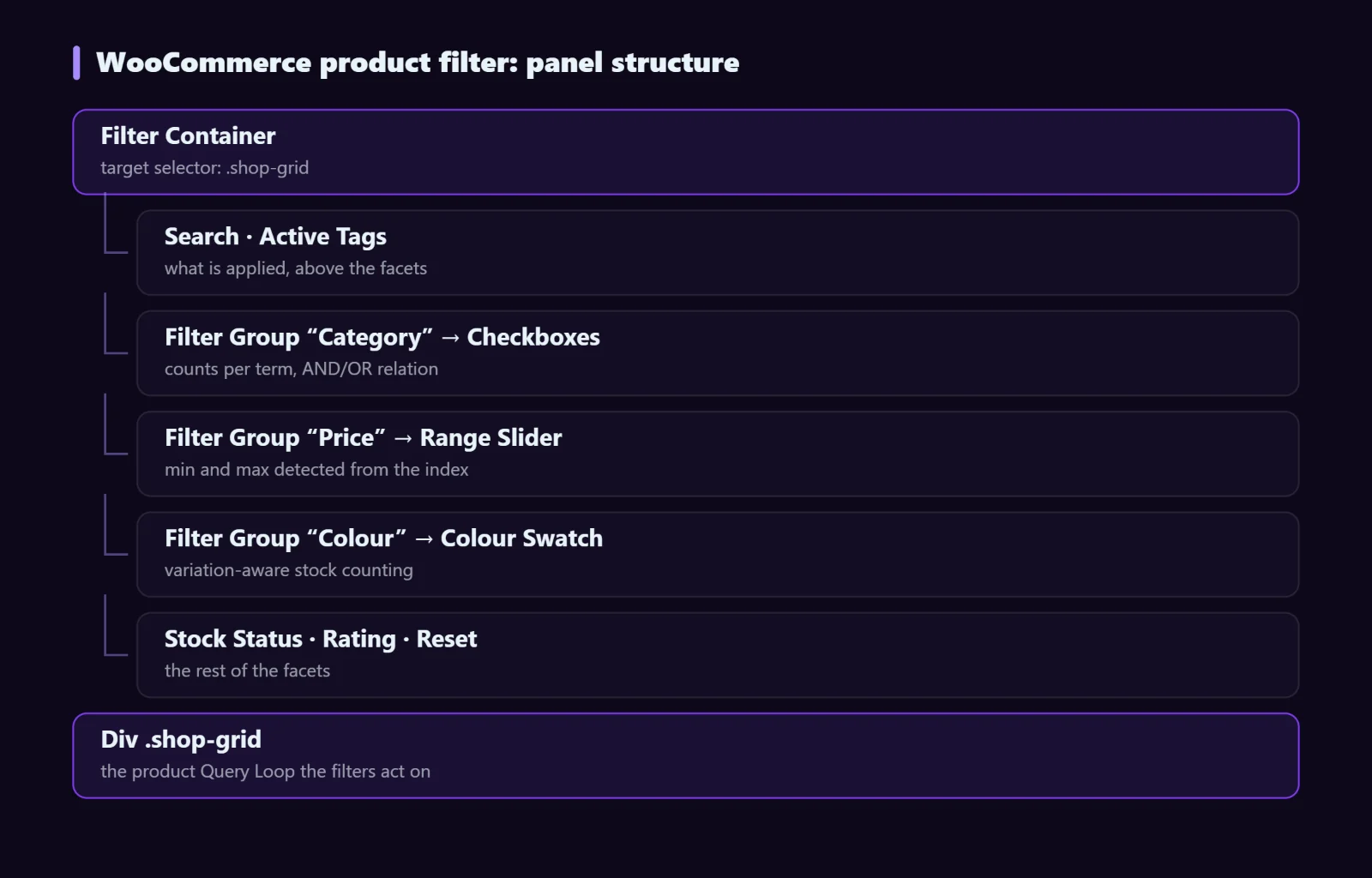
Two placement decisions do most of the work. Put Active Tags near the top, above the facets — shoppers need to see what is applied before they can reason about what to change. And wrap each facet in a Filter Group so long lists collapse; a panel with eight expanded facets is a panel nobody scrolls.
5. Add sorting
The Sort / Order element goes above the grid, not in the sidebar — it is a property of the results, not a filter on them. Order by price, date, title or any meta key.
6. Make it work on a phone
A sidebar is a desktop idea. On mobile, use the Offcanvas Panel element: the filters live in a slide-out drawer triggered by a button above the grid. Keep Active Tags visible outside the drawer so the current state is on screen while browsing.
Consider switching to manual apply mode on mobile by adding the Apply Button element. On a phone, re-rendering the grid after every tap means the shopper loses their place; batching the changes behind one Apply tap is calmer and uses less data.
Conditional facets
Conditional Logic shows or hides a filter based on another filter’s active state. The canonical use: show the “Screen size” facet only once the shopper has selected the “Monitors” category. It keeps a panel short on arrival without hiding anything the shopper will need once they have narrowed down.
WooCommerce product filter performance and caching
Two layers. The index removes the live JOINs; a shared anonymous cache then stores the AJAX response per URL state, so repeat filter combinations are served with no database work at all.
| Setting | Default | Shop guidance |
|---|---|---|
cache_ttl | 3600s | Lower it if stock and prices change through the day |
cache_driver | transients | Use your object cache (Redis, Memcached) if you have one |
ajax_debounce | 300ms | Raise slightly for a range slider, which fires continuously |
url_mode | pushState | Keep pushState so the back button undoes a filter |
index_batch | 200 | Lower on a memory-limited host during a rebuild |
One shop-specific warning: a cached filter response can show stock that has since sold out. Keep the TTL short on a fast-moving catalogue, and never cache the cart or checkout. wp djia cache flush clears everything after a price change.
SEO: do not let filters eat your crawl budget
Filter combinations multiply fast. Six facets with five values each is more URLs than you have products, and every one of them is a thin, near-duplicate page.
- Keep the canonical on filtered views pointing at the clean archive.
- Do not link to filtered URLs from your navigation, and do not put them in the sitemap.
- For the two or three combinations with real search demand — “black running shoes” — build a proper category or landing page with its own copy and title instead. That page can rank; a filter state cannot.
Troubleshooting
Filters do nothing
The target selector does not match the listing wrapper. Inspect the page and confirm the class is on the container that holds the loop, not on the card.
Price slider has the wrong range
Boundaries come from the index. Rebuild it after any bulk price change.
Attribute filter shows nothing
The products use per-product custom attributes rather than global attribute taxonomies. Only global attributes are filterable — the same requirement that swatches have.
Counts do not match the results
A stale index, usually after an import. Rebuild.
FAQ
Does this work on category archives too?
Yes. The filters narrow within whatever the archive query already returns, so on a category page they filter inside that category.
How many products can it handle?
The index is built for large catalogues — it is a flat table rather than live JOINs, so filtering cost stays roughly flat as the catalogue grows. Pair it with pagination; the bottleneck on a big shop is rendering hundreds of cards, not the query.
Can I filter a non-WooCommerce listing the same way?
Yes — the same elements work on any Query Loop over any public post type. The general filter guide covers that case.
Next steps
Djia Filters is included in every Djia Bricks licence, alongside the six WooCommerce modules. See the filters feature page for all 15 elements, the filter documentation for index and cache detail, or pick a licence.